> ## Documentation Index
> Fetch the complete documentation index at: https://docs.clustr-ai.com/llms.txt
> Use this file to discover all available pages before exploring further.
# Attio Integration
> Connect Attio to surface referral intelligence on people, companies, and deals
Clustr's native Attio integration surfaces your network intelligence directly inside Attio through **widgets** on people, company, and deal records.
## Connect Attio
1. Go to **Integrations** in the Clustr dashboard and select **Attio**.
2. Click **Connect Attio**. You'll be redirected to Attio to authorize access.
3. Once authorized, you'll be returned to Clustr with your workspace connected.
Only one CRM can be active at a time. If HubSpot or Salesforce is already connected, disconnect it before connecting Attio.
## Enable the Widget
After connecting, you need to add the Clustr widget to your Attio record layouts. This is a one-time setup per record type; repeat for people, companies, and deals.
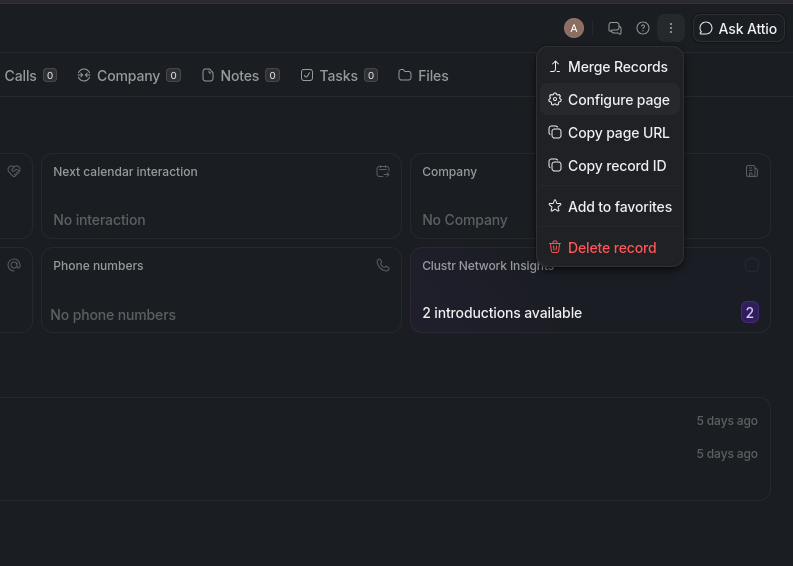
Open any people (or company, or deal) record in Attio. Click the **⋯ menu** in the top-right corner, then select **Configure page**.
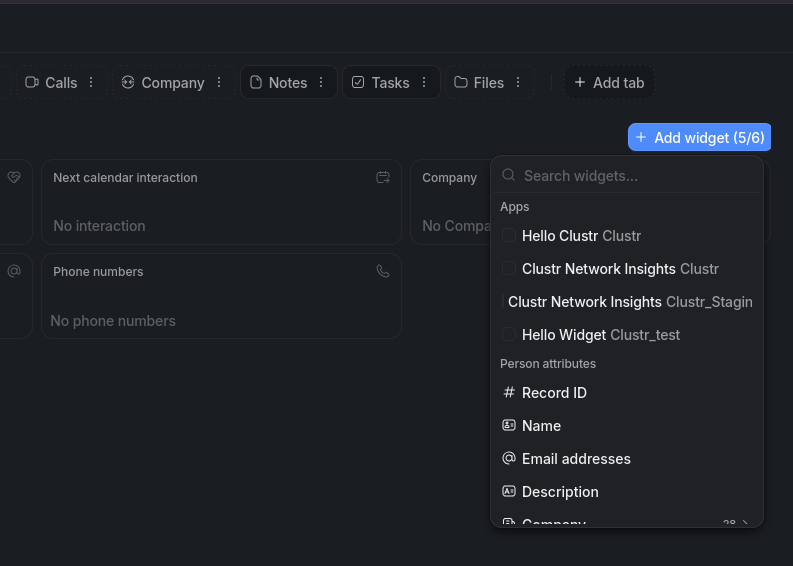
 Click **+ Add widget**. A widget picker opens. Under **Apps**, select **Clustr Network Insights**.
 Close the configurator. The Clustr widget now appears on all records of that type.
**Widget names to look for:**
| Record type | Widget name |
| ----------- | ------------------------ |
| People | Clustr Network Insights |
| Companies | Clustr Company Insights |
| Deals | Clustr Deal Intelligence |
## How It Works
People and companies in Attio are automatically matched to your Clustr network via domain and LinkedIn URL. Each widget shows who in your network can make an introduction, ranked by confidence.
Close the configurator. The Clustr widget now appears on all records of that type.
**Widget names to look for:**
| Record type | Widget name |
| ----------- | ------------------------ |
| People | Clustr Network Insights |
| Companies | Clustr Company Insights |
| Deals | Clustr Deal Intelligence |
## How It Works
People and companies in Attio are automatically matched to your Clustr network via domain and LinkedIn URL. Each widget shows who in your network can make an introduction, ranked by confidence.
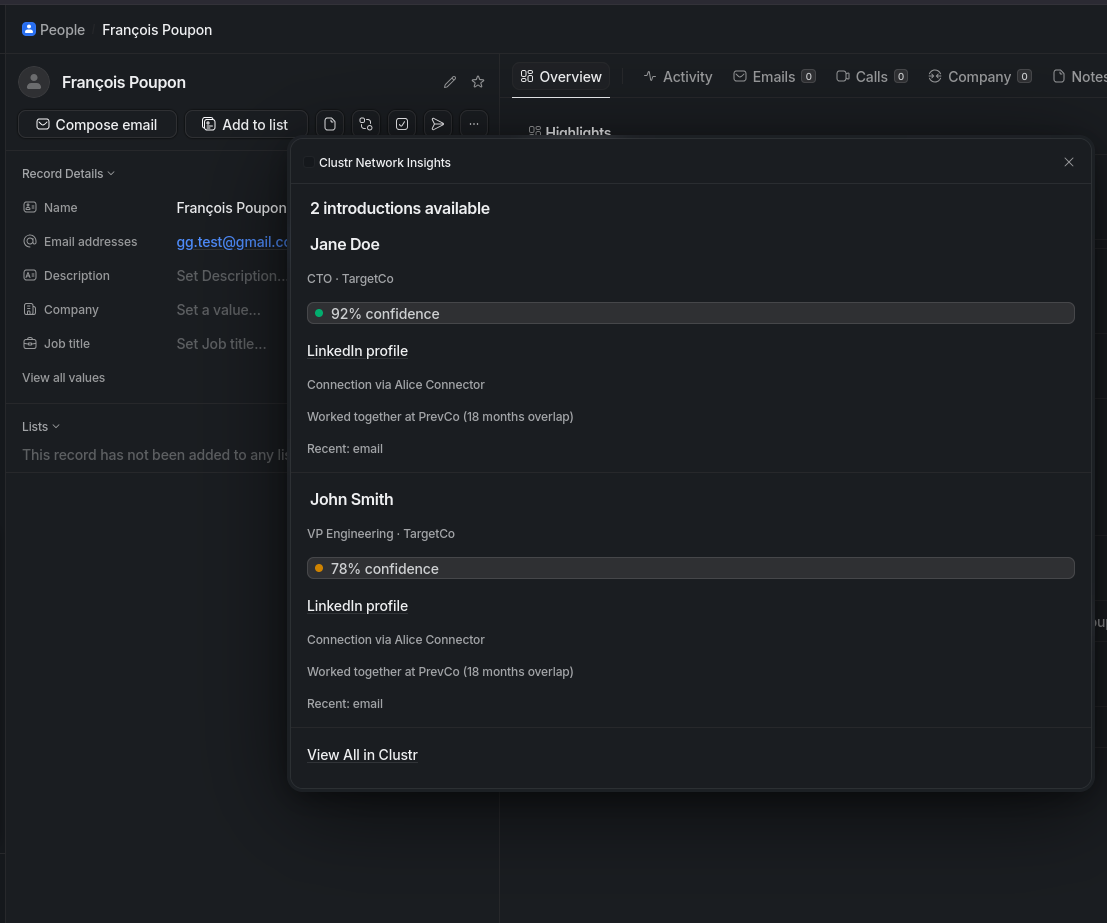 Each entry shows:
* A **confidence score** for the referral path
* The **connector** who can make the introduction and how they're connected
* Shared work history and recent engagement signals
* A **View All in Clustr** link to explore the full list
## Settings
Once connected, you can configure write permissions and field mappings from the Attio integration settings page.
### Write to Attio
| Permission | Description |
| ---------------- | -------------------------------------------------------------------------------------- |
| Create Contacts | Push new people Clustr discovers into Attio |
| Create Companies | Create company records when a contact's employer is missing (requires Create Contacts) |
| Tasks & Notes | Log warm-intro requests as tasks and add notes to records |
### Field Mappings
Clustr maps its internal data model to your Attio attribute slugs. The defaults match Attio's standard schema. Change them only if your workspace uses custom attributes.
**People**
| Clustr field | Default Attio attribute |
| ------------ | --------------------------- |
| LinkedIn URL | `linkedin` |
| Email | `email_addresses` *(fixed)* |
| First Name | `first_name` |
| Last Name | `last_name` |
| Phone | `phone_numbers` |
| Job Title | `job_title` |
**Companies**
| Clustr field | Default Attio attribute |
| ------------ | ----------------------- |
| Name | `name` |
| Domain | `domains` |
**Deals**
| Clustr field | Default Attio attribute |
| ------------ | ----------------------- |
| Name | `name` |
| Amount | `value` |
| Stage | `stage` |
The **Email** field is fixed to `email_addresses` and cannot be remapped. Attio requires this attribute for contact deduplication.
### Sync
Click **Sync Now** to trigger a manual sync between Attio and Clustr. The integration also syncs automatically in the background.
Each entry shows:
* A **confidence score** for the referral path
* The **connector** who can make the introduction and how they're connected
* Shared work history and recent engagement signals
* A **View All in Clustr** link to explore the full list
## Settings
Once connected, you can configure write permissions and field mappings from the Attio integration settings page.
### Write to Attio
| Permission | Description |
| ---------------- | -------------------------------------------------------------------------------------- |
| Create Contacts | Push new people Clustr discovers into Attio |
| Create Companies | Create company records when a contact's employer is missing (requires Create Contacts) |
| Tasks & Notes | Log warm-intro requests as tasks and add notes to records |
### Field Mappings
Clustr maps its internal data model to your Attio attribute slugs. The defaults match Attio's standard schema. Change them only if your workspace uses custom attributes.
**People**
| Clustr field | Default Attio attribute |
| ------------ | --------------------------- |
| LinkedIn URL | `linkedin` |
| Email | `email_addresses` *(fixed)* |
| First Name | `first_name` |
| Last Name | `last_name` |
| Phone | `phone_numbers` |
| Job Title | `job_title` |
**Companies**
| Clustr field | Default Attio attribute |
| ------------ | ----------------------- |
| Name | `name` |
| Domain | `domains` |
**Deals**
| Clustr field | Default Attio attribute |
| ------------ | ----------------------- |
| Name | `name` |
| Amount | `value` |
| Stage | `stage` |
The **Email** field is fixed to `email_addresses` and cannot be remapped. Attio requires this attribute for contact deduplication.
### Sync
Click **Sync Now** to trigger a manual sync between Attio and Clustr. The integration also syncs automatically in the background.